
The MOSS-VL integration code has been merged into the LlamaFactory main branch. Whether you want to use LoRA to validate an idea at low cost or perform full-parameter fine-tuning for thorough training in a specific domain, you can reuse LlamaFactory’s familiar workflows for data preparation, training, checkpoint resumption, and inference.
This article first introduces how to complete a general MOSS-VL multimodal fine-tuning task through the WebUI, using publicly available basketball video data throughout the data preparation and training configuration process. After training, we first examine how the model changes on real basketball clips, then use Chinese chess notation to demonstrate its ability to learn an entirely new specialized task.
MOSS-VL × LlamaFactory
MOSS-VL is a multimodal model designed for image and video understanding. With this integration, LlamaFactory can correctly process MOSS-VL’s visual inputs, cross-modal attention masks, and training labels, completing the full training and generation workflow.
End-to-end validation is now complete:
-
LoRA fine-tuning: Training, saving, checkpoint resumption, Adapter inference, and weight merging are all supported.
-
Full-parameter fine-tuning: All parameters can be unfrozen, with training, saving, checkpoint resumption, and inference all supported.
-
Multimodal generation: After training, the model can generate normally through the chat and predict-with-generate paths.
The integration has passed community review and been merged into the main branch: LlamaFactory PR #10708.
Code Fine-Tuning: LoRA and Full Parameters, Two Paths with One Workflow
LoRA is suitable for rapid experimentation and capability injection at a lower GPU memory cost. Full-parameter fine-tuning is suitable for scenarios that require more substantial changes to a model’s domain behavior, output format, or specialized knowledge. The only change required is finetuning_type:
model_name_or_path: OpenMOSS-Team/MOSS-VL-Instruct-0708
template: moss_vl
stage: sft
do_train: true

# 选择 lora 或 full
finetuning_type: lora

dataset: your_multimodal_dataset
output_dir: saves/moss_vl/sft
The model and task remain freely selectable by the user. LlamaFactory provides a unified training entry point, data pipeline, distributed training, checkpoint management, and subsequent inference.
WebUI Fine-Tuning: Run MOSS-VL Multimodal Training with No Code
You do not need to write a training script first. You can complete model selection, data configuration, and training monitoring in LlamaFactory’s WebUI. The following is a general workflow for multimodal tasks involving images and videos. For easier reproduction, we use publicly available basketball video data to demonstrate each step.
1. Install the Environment
We recommend using an isolated Python 3.11 or 3.12 environment and first installing a version of PyTorch compatible with your local CUDA setup. Then clone the latest version of LlamaFactory and install the additional dependencies for MOSS-VL:
conda create -n llamafactory python=3.12 -y
conda activate llamafactory

git clone --depth 1 https://github.com/hiyouga/LlamaFactory.git
cd LlamaFactory
pip install -e .
pip install -r requirements/moss-vl.txt

llamafactory-cli version
requirements/moss-vl.txt installs dependencies such as Transformers and TorchCodec that are compatible with MOSS-VL. For a first attempt, LoRA is recommended. Full-parameter fine-tuning is better suited to multi-GPU environments with substantial GPU memory.
2. Prepare Multimodal Data (Using Public Basketball Data as an Example)
This tutorial uses the open-source saveerjain/basketball-events dataset. It contains short videos of real games and structured event annotations for learning shots, assists, blocks, rebounds, jersey colors, jersey numbers, shot types, and shot results.
hf download saveerjain/basketball-events --repo-type dataset --local-dir data/basketball-events
Register the training file in data/basketball-events/dataset_info.json, and the WebUI will be able to recognize the dataset:
{
 "basketball_events": {
 "file_name": "annotations/train_qwen.json",
 "formatting": "sharegpt",
 "columns": {
 "messages": "messages",
 "videos": "videos"
 },
 "tags": {
 "role_tag": "role",
 "content_tag": "content",
 "user_tag": "user",
 "assistant_tag": "assistant"
 }
 }
}
The user messages in the video samples use the <video> tag to mark the visual input and point to the corresponding files through the videos field. Before starting training, make sure that the video paths in the annotation file can be correctly resolved within the data directory.
3. Launch the WebUI
Run the following command in the LlamaFactory root directory:
llamafactory-cli webui
4. Configure and Start Training
On the Train page, select MOSS-VL-Instruct-0708. The model path will be automatically populated as OpenMOSS-Team/MOSS-VL-Instruct-0708, and the template should be set to moss_vl. Select SFT as the training stage, then choose LoRA or Full based on your available resources.

WebUI Model and Fine-Tuning Method Configuration
Set the data directory to projects/basketball_event_sft/data, select mossvl_basketball_events_train, and click Preview dataset to check whether the data is correct.

WebUI Dataset Selection and Preview
On the parameter configuration page, you can use the default parameters to configure training.
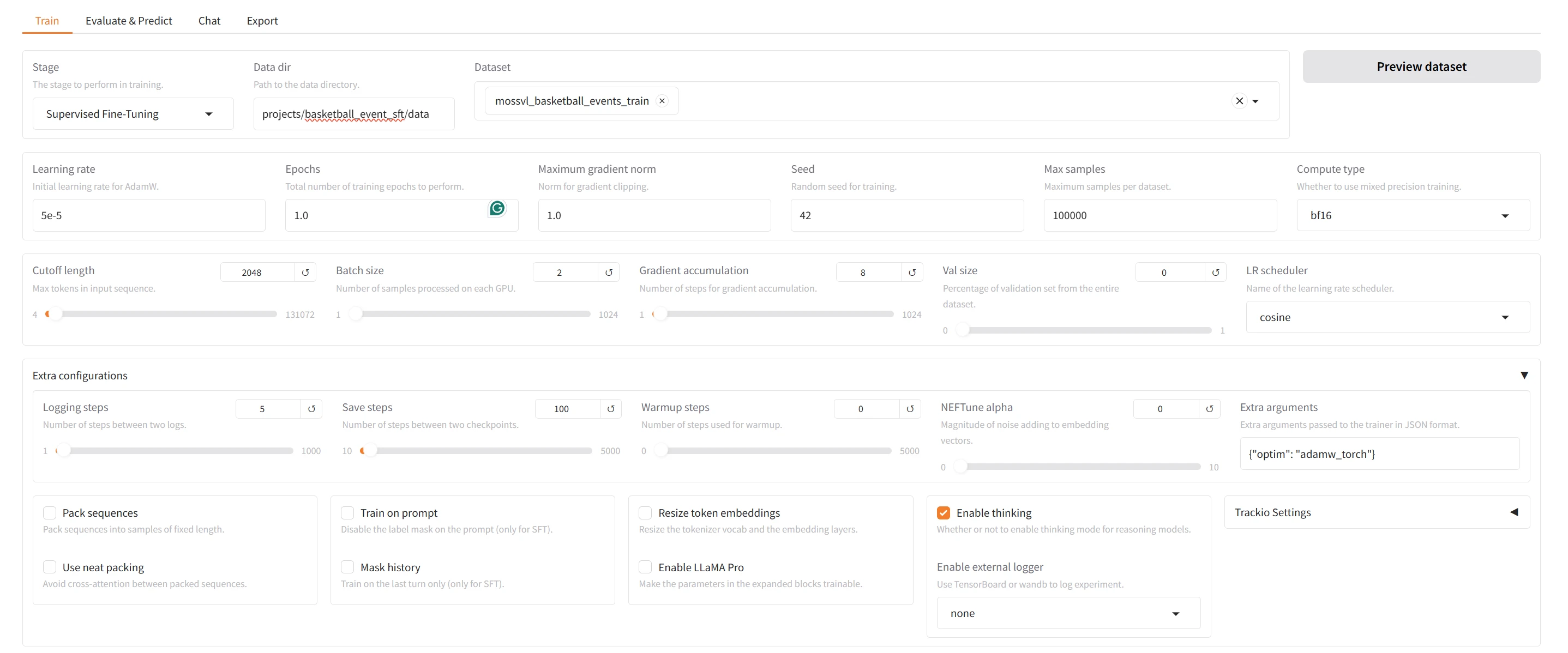
WebUI Training Parameter Configuration
You can also freeze different model components individually by module.

WebUI Multimodal Component Freeze Configuration
Click “Preview command” to check the final configuration. Once everything is confirmed, click “Start” to view the training logs, progress, and loss curves on the page.

WebUI Command Preview and Training Launch
Example 1: Helping MOSS-VL Understand a Real Jump Shot
After training, we return to the basketball task introduced above. In a real game, players move quickly and camera positions constantly change. The key action that determines an event label often lasts only a few seconds, making this task well suited to testing whether the model has truly learned more fine-grained video understanding.
We use a collection of real game clips to teach MOSS-VL to identify players, shooting actions, and game results. The following video was not included in training: Green No. 4 dribbles toward the free-throw line, stops and jumps in front of a defender, and completes and makes a two-point jump shot.
Basketball Two-Point Jump Shot Recognition Demo
Input Prompt
Analyze this basketball clip. The two teams are wearing White and Green jerseys. Identify all shots, assists, blocks, and offensive rebounds. For each event, specify the player's jersey color and number; for shots, also provide the shot type and make/miss result. Return valid JSON with an “events” array.
Base: Most of the Content Is Already Understood
{
 "events": [
 {
 "jersey": "Green",
 "number": "4",
 "event": "shot",
 "shot_type": "layup",
 "result": "make"
 }
 ]
}
The base model understood most of the content: it correctly identified Green No. 4, recognized that this was a shot, and determined that it was made. Its only error was describing the mid-range jump shot as a layup.
Full SFT: Adding the Decisive Detail
{
 "events":[
 {
 "jersey":"Green",
 "number":"4",
 "event":"shot",
 "shot_type":"2-pt jump shot",
 "result":"make"
 }
 ]
}
After one round of full-parameter fine-tuning, the model retained its original correct judgments while accurately identifying the action as a “two-point jump shot.” The difference between “roughly understanding what happened” and “clearly describing what happened” lies in this key detail.
| Model | Player | Event | Shot Type | Result |
|---|---|---|---|---|
| Base | Green No. 4 | Shot | Layup | Made |
| Full SFT | Green No. 4 | Shot | Two-Point Jump Shot | Made |
The basketball example shows how fine-tuning helps the model see real-world video in greater detail and describe it more reliably, moving from a rough understanding to an accurate description of the action type. Next, we turn to a completely different task to see whether the same training workflow can teach the model a new specialized “language.”
Example 2: Reconstructing Chinese Chess Notation from a Video
As a second example, we created a Chinese chess video SFT dataset. The scenes use a standard chessboard rendering, with different intervals between moves. Unlike basketball event classification, the model must simultaneously perform temporal observation, piece recognition, and move understanding, then translate the entire sequence into standard Chinese chess notation.
The following demo video was not included in training. It is approximately 31.8 seconds long, contains 14 half-moves, and has a resolution of 640 × 720.
Chinese Chess Notation Recognition Demo
Input Prompt
Please identify the Chinese chess moves in the video in order, use standard Chinese notation, and return strictly valid JSON: {"moves_zh":[...]}.
Reference Answer
{
 "moves_zh":[
 "卒3进1","相七进五",
 "马8进9","马二进三",
 "炮8平6","车一进一",
 "车9平8","炮二平一",
 "马2进3","兵七进一",
 "卒3进1","马八进六",
 "象3进5","车九平七"
 ]
}
The Same Video: Base vs. Full SFT
We tested the original MOSS-VL-Instruct-0708 and the fully fine-tuned checkpoint-600 using exactly the same video and input prompt. To present the pre-training result in full, the Base answer was selected from 38 samples using the same prompt. It was a sample that stopped naturally without obvious repetition; correctness against the reference answer was not considered during selection. The post-training result uses the complete generation from checkpoint-600 directly.
Before Training: Base Model
The following is the recommended Base result: temperature=0.7, top_p=0.9, and seed=331. It stopped naturally after 211 tokens, and the JSON is parseable. However, each array element combines one Red move and one Black move, and the notation does not match the video, so the target task was not completed.
{
 "moves_zh": [
 "炮二平五 车9平8",
 "兵三进一 马8进7",
 "兵七进一 车1平2",
 "炮八平六 马2进3",
 "兵三进一 车2进5",
 "兵七进一 马3进2",
 "炮二平四 车2平4",
 "兵三进一 马2退3",
 "兵三进一 炮8平6",
 "车一平二 车4进5",
 "车二进四 马3退5",
 "车二平三 车4平6",
 "车三进二 马5进6",
 "车三退一 车6平4",
 "车三平四 马6退8"
 ]
}
After Training: Full SFT checkpoint-600
The fine-tuned model returned a JSON array as required. All 14 identified moves matched the reference notation exactly, and the model stopped normally after completing the answer.
{
 "moves_zh":[
 "卒3进1","相七进五",
 "马8进9","马二进三",
 "炮8平6","车一进一",
 "车9平8","炮二平一",
 "马2进3","兵七进一",
 "卒3进1","马八进六",
 "象3进5","车九平七"
 ]
}
| Model | Output Structure | Notation Match | Generation Termination |
|---|---|---|---|
| Base (recommended sample) | Valid JSON, but each item combines two moves | 0 / 14 | Stopped naturally, 211 tokens |
| Full SFT checkpoint-600 | Target JSON array, one move per item | 14 / 14 | Stopped naturally, 76 tokens |
More Than a Single Impressive Example
We also conducted a fixed evaluation on 200 synthetic videos that were not included in training, using LCS Recall to measure overall recognition performance. We calculated the longest sequence of moves that appeared in the same order in the predicted and reference notation, then divided it by the length of the reference notation. After full-parameter fine-tuning, LCS Recall increased from 7.1% to 83.1%.
| Metric | Base | Full SFT checkpoint-600 |
|---|---|---|
| LCS Recall | 7.1% | 83.1% |
Through LlamaFactory’s standard fine-tuning workflow, MOSS-VL can effectively learn new video tasks, specialized notation systems, and strict output formats.
Start Fine-Tuning Your MOSS-VL
From basketball events and Chinese chess notation to industrial videos and image question answering in specialized domains, developers can now prepare their own multimodal data directly in LlamaFactory, choose LoRA or full-parameter training for MOSS-VL, and reuse the same workflow for saving, resuming, and inference.
Model: OpenMOSS-Team/MOSS-VL-Instruct-0708
Adaptation PR: hiyouga/LlamaFactory#10708
Training framework: LlamaFactory.